End-of-year busyness can make it challenging to use your benefits. You can now redeem Extra time with your Epassi benefits – meaning you use your benefits now and decide later which services you want to use them for. This helps you avoid rushed purchases and get the maximum value from your benefits.
Your Extra time balance is valid until 31 March 2026. Best of all, we will remind you well in advance before your Extra time balance expires – unlike personal gift cards, which are easy to forget and let expire.
You can redeem Extra time using your employer-provided sport, culture, massage, dental or health benefits. In the app’s location search, look for the keyword "extra time" and select the location based on which benefit you want to use. Then, under Payment methods, choose the amount you want to transfer from your benefit balance to your Extra time balance. Redemption is only possible with predefined amounts, such as €5, €10 or €50, meaning the selected amount will be transferred to your Extra time balance. Confirm at the bottom of the page. Redeeming Extra time does not cost anything extra – the redeemed amount is simply deducted from your benefit balance.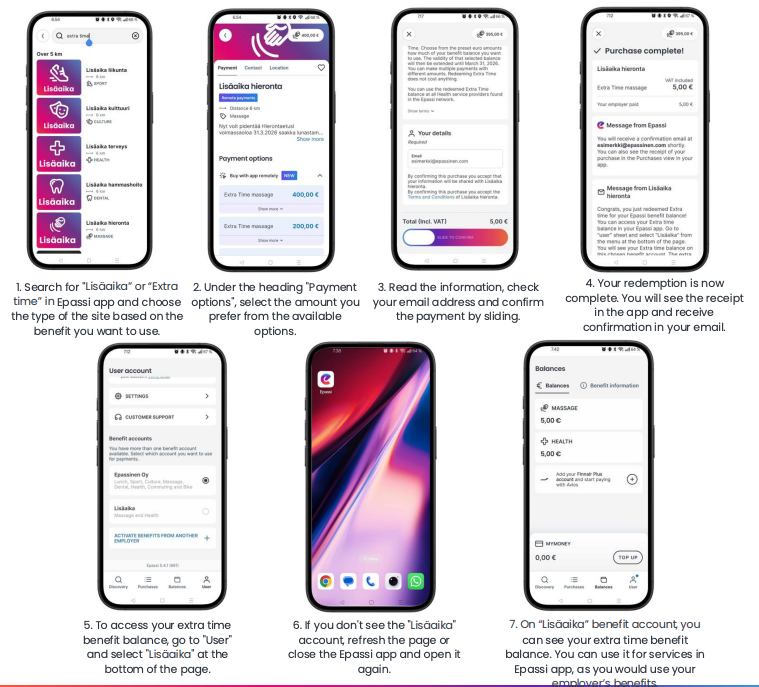
Example 1
You have €50 of sport benefit remaining and want to redeem Extra time. Search for “Extra time” in the app, choose the sport site and select the predefined amount €50. The entire €50 sport balance is transferred to your Extra time balance. After this, your exercise balance is €0 and you will find €50 in your Extra time account.
Example 2
You have €65 of Massage benefit remaining and want to redeem Extra time for the full balance. Search for “Extra time” in the app, choose the massage site and select the most suitable predefined amounts. Even if the exact balance is not available as a single option, you can make several redemptions with different amounts. All redemptions are combined into one balance, e.g. €50 + €10 + €5 = €65.
Use your redeemed Extra time balance in the app
You can use your Extra time balance at network locations in the same way as your regular benefit balances. You can access your Extra time balance in the app by going to User and selecting Extra time at the bottom of the page under Benefit accounts. On this benefit account, you can see your Extra time balance.
Please note that payments are always charged from one benefit account at a time. Remember to switch back to your employer’s benefit account in the menu so you can continue using your employer-provided benefits.
Was this article helpful?
That’s Great!
Thank you for your feedback
Sorry! We couldn't be helpful
Thank you for your feedback
Feedback sent
We appreciate your effort and will try to fix the article